Choose an activity type
Look for a video to follow, a game to play, a printable activity or an instrument course.
Home learning · Content Bank
What does your child feel like doing today? Search for an instrument, choose a musical skill or browse the tiles until something catches their eye.
The Content Bank brings the songs, listening games, movement activities, printables and practice tools used in primary schools into your family’s workspace.
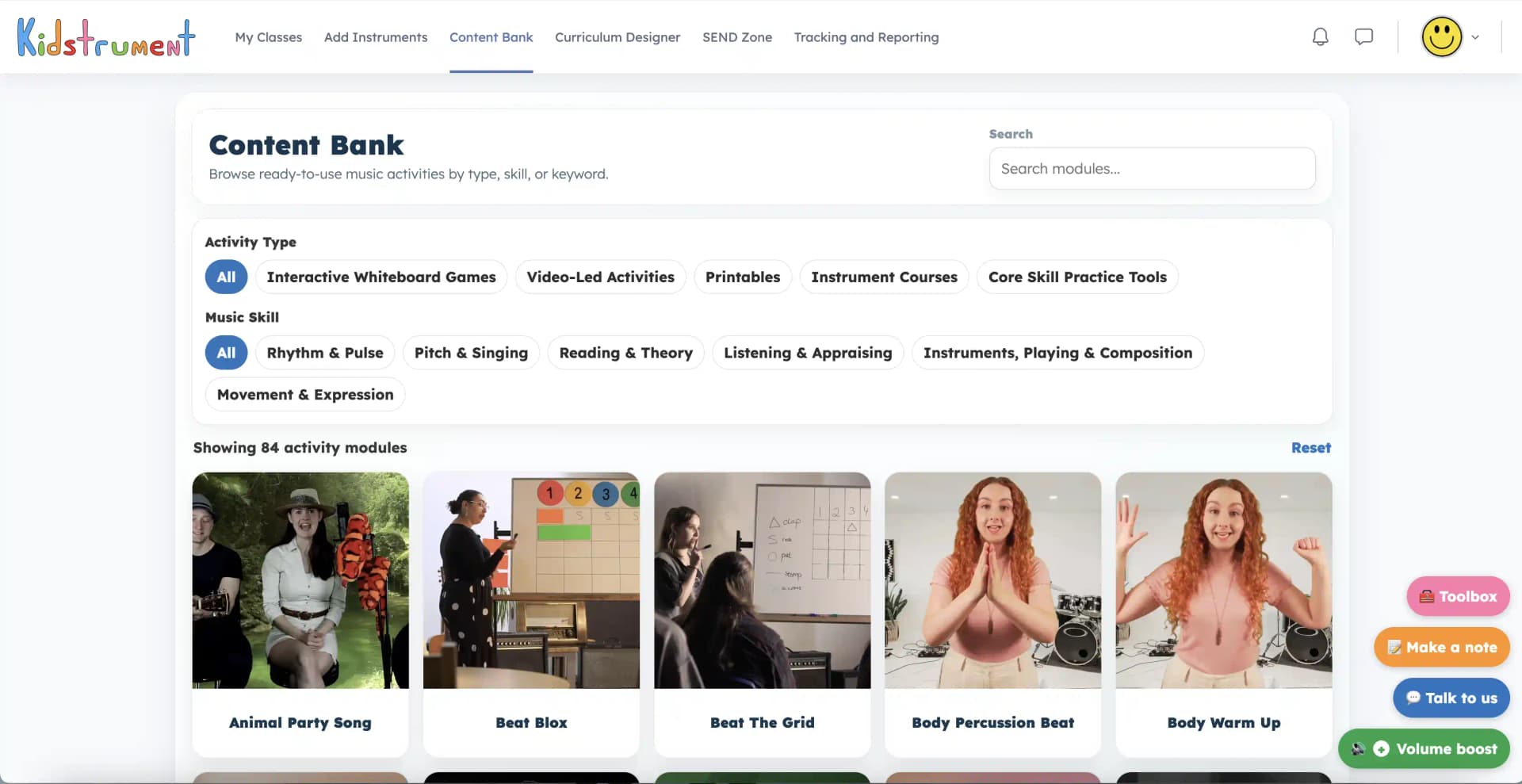
Finding an activity
Type ‘guitar’ when your child wants to hear strings, or look for rhythm and pulse when you feel like clapping together. The filters let you narrow a search by what you want to practise and how you want to join in.
Activities are grouped into tiles. Inside each tile you can see the individual games, songs or tasks that belong together.
Look for a video to follow, a game to play, a printable activity or an instrument course.
Find activities for keeping a beat, singing, recognising notes, listening closely, playing instruments or making up music.
Choose Beat Blox for a rhythm activity, Body Percussion Beat to make sounds with your hands, or Critical Listening for a listening challenge.
Clear the filters to switch from a quiet listening activity to something more energetic.
Inside the Content Bank
Open a tile for an overview of the activity. You can find out what it sounds like, what your child is invited to do and which musical skills it explores.
Teacher notes are there for the adult leading the activity. Have a look at the steps first, then open the player when you’re ready to try it together.
At home
You might have five minutes before lunch or a whole afternoon with an instrument. A single activity can stand on its own, or you can choose one that builds on the music in your current scheme.
If a rhythm was tricky yesterday, find a slower way to practise it. If a particular sound fascinated your child, follow that interest into a new listening activity.
Try Instrument Flashcards together. Name an instrument, describe how it sounds, then see who recognises it next time.
Choose Beat Blox, Body Percussion Beat or Clap the Pulse and take turns leading a short pattern.
Try Hear the Difference or Critical Listening. Play a recording again and compare the details you each noticed.
Look for a worksheet or use a practice tool with an instrument. Workbook PDFs can be previewed during the trial and downloaded with a paid membership.
Getting started
Choose an activity within the group. Depending on the item, you might find a recording, video, printable page or an interactive game.
Open the activity in the player. When the full-screen option is available, use it to give your child more room to watch or play.
Check the aim and the steps so you know what to listen for and how to introduce the activity.
Look through the individual activities on the tile and choose one for today.
Listen, sing or tap along together. Pause whenever your child wants another go.
Quick answers
Yes. Filter for skills such as rhythm and pulse, pitch and singing, reading and theory, or listening and appraising. Add an activity-type filter to narrow your choice.
You can begin with a listening game or a song to follow by ear. The overview and notes tell you what to do, so you can look through the steps before you invite your child to join in.
Look for worksheets and printable activities, or use the guides to play an instrument. During a trial you can preview workbook PDFs. Paid Home learning membership enables workbook downloads.
Yes. Follow the scheme for your regular lessons, then use the bank to revisit a skill or explore a song or instrument that interested your child.
Open the SEND Zone to look at activities by support focus. You’ll find ideas for listening, turn-taking, movement and other ways into the music.
Explore SEND at homeStart a 14-day home trial with a card and explore the Content Bank in your own family workspace.
Explore examples